Pages
  • Queztaz.org
  • Queztaz/Book List
  • Queztaz/Tech Inventory
  • Emacs/EWW Hacks
  • Emacs/Emacs With BiDirectional Google Calendar Sync
  • Emacs/Setting up Mu4e and Multiple Gmail Accounts
  • Linux/Creating an Offline Debian Mirror Repository
  • Linux/Migrate Wiki.js to Another Server
  • Linux/Adding Bitwarden to the Pinephone Pro
  • Linux/Corebooting Thinkpad X220 With CH341A Programmer
  • Pinebook Pro/Custom Kernel
  • Pinebook Pro/Keyboard Firmware Update
  • Pinebook Pro/Netbsd Installation
  • Pinebook Pro/Setting Up Zram
  • Pinebook Troubleshooting/Pro Common Issues
  • Pinebook Pro/Use NVME as Root
  • Pinebook Pro/Write to SPI Flash
  • Qemu/Chroot Into a Different Architecture
  • Qemu/Choot Into an Img File
  • Qemu/Mount Virtual Images
  • Qemu/Windows Xp Fix Smb Not Working
  • Qemu/Windows Xp Installation
  • Misc/Finding the Default Wireless Password to TG1672G Routers
  • Misc/Running Ollama Portably
  • Misc/Resetting Unifi Controller Password with MongoDB CLI
  • Misc/Turning an Amazon FireStick into a Portable Computer
  • Misc/Decent Usable Android Flip Phone
  • Windows/Cloning a Bios Boot Drive to Disimilar Hardware with UEFI
  • Windows/Automatic CHKDSK Scans Using Powershell & Email Alerts
  • Windows/Creating a Decent Portable Terminal
  • Windows/Merging HyperV Snapshots With Powershell
  • Windows/Simulating Bad Blocks on NTFS Filesystems
  • Windows/Creating and Viewing a Storport on Windows Server
  • Windows/Windows 11 PowerShell Upgrade Script
  • Windows/Prepare system for Virtualbox Virtualization
  • Mikrotik/Creating a Client to Site VPN With
  • Mikrotik/Securing Router With Firewall
  • Mikrotik Setup Dynamically Changing IP With No-IP Api
Queztaz.org
  • Queztaz.org
  • Queztaz/Book List
  • Queztaz/Tech Inventory
  • Emacs/EWW Hacks
  • Emacs/Emacs With BiDirectional Google Calendar Sync
  • Emacs/Setting up Mu4e and Multiple Gmail Accounts
  • Linux/Creating an Offline Debian Mirror Repository
  • Linux/Migrate Wiki.js to Another Server
  • Linux/Adding Bitwarden to the Pinephone Pro
  • Linux/Corebooting Thinkpad X220 With CH341A Programmer
  • Pinebook Pro/Custom Kernel
  • Pinebook Pro/Keyboard Firmware Update
  • Pinebook Pro/Netbsd Installation
  • Pinebook Pro/Setting Up Zram
  • Pinebook Troubleshooting/Pro Common Issues
  • Pinebook Pro/Use NVME as Root
  • Pinebook Pro/Write to SPI Flash
  • Qemu/Chroot Into a Different Architecture
  • Qemu/Choot Into an Img File
  • Qemu/Mount Virtual Images
  • Qemu/Windows Xp Fix Smb Not Working
  • Qemu/Windows Xp Installation
  • Misc/Finding the Default Wireless Password to TG1672G Routers
  • Misc/Running Ollama Portably
  • Misc/Resetting Unifi Controller Password with MongoDB CLI
  • Misc/Turning an Amazon FireStick into a Portable Computer
  • Misc/Decent Usable Android Flip Phone
  • Windows/Cloning a Bios Boot Drive to Disimilar Hardware with UEFI
  • Windows/Automatic CHKDSK Scans Using Powershell & Email Alerts
  • Windows/Creating a Decent Portable Terminal
  • Windows/Merging HyperV Snapshots With Powershell
  • Windows/Simulating Bad Blocks on NTFS Filesystems
  • Windows/Creating and Viewing a Storport on Windows Server
  • Windows/Windows 11 PowerShell Upgrade Script
  • Windows/Prepare system for Virtualbox Virtualization
  • Mikrotik/Creating a Client to Site VPN With
  • Mikrotik/Securing Router With Firewall
  • Mikrotik Setup Dynamically Changing IP With No-IP Api

Misc/Decent Usable Android Flip Phone

Table of content
  • How to enable developer options
  • How to enable ADB Debugging
  • How to install APKs

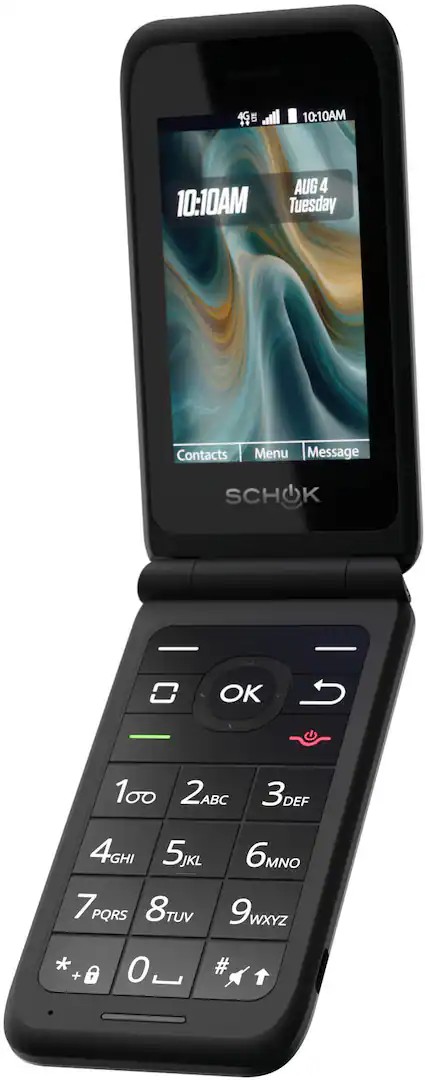
This flip phone works pretty well.

flipphone

It's Schok Volt Flip Model SC3218. I purchased it in 07 of 2026 from a local best buy.

The phone has a few great features which allow it do to most things other phones can

  1. It runs Android 8.0, making it compatible with Tailscale. Android 8 contains the androidx.security:security-crypto library which some apps rely on now.

  2. Developer Mode can be enabled

  3. ADB Debugging can be enabled

  4. Sideloading APKs is allowed

How to enable developer options

  1. Open the "Tools and Settings" app

  2. Click "Lock Control 2.0"

  3. Click "System Control"

  4. Click "Allow developer mode". While you are here, enable the Virtual Mouse if you haven't already

Developer mode can then be enabled from the system settings by clicking the build number of the device 10 or so times until the developer options appear.

How to enable ADB Debugging

  1. Enter the developer options to turn it one.

  2. Ensure the USB settings are set to MTP

  3. Use a data compatible USB-C cable to test ADB. Some users report that their phones are locked at "Charging Only" in the settings. I experienced this too and found that it was because my charger was a charge only cable. That was why it perceptibly looked like the option was locked in my case.

How to install APKs

  1. Use ADB and install armeabi-v7a Android 8.0 APKS.

I had success installing some with the file manager and some with ADB from a PC. If the ADB command ever freezes then it indicates something about the application does not work with this phone. I know this phone is missing some media codecs which make some applications like "scrcpy"

Here is a list of applications that I've installed. You can copy the name of each program to find an APK online. I downloaded most of them from F-Droid and some of them from apkmirror.com.

The name of "QRCodeGenerator-de.t_dankworth.secscanqr_21.apk" would be "de.t_dankworth.secscanqr_21.apk"

PhotoViewer-gallery-396-proprietary-release.apk
Wikipedia-org.wikipedia_50594.apk
QRCodeGenerator-de.t_dankworth.secscanqr_21.apk
DeviceHWInfo-ru.andr7e.deviceinfohw_5.23.1-234_minAPI15(nodpi)_apkmirror.com.apk
TextEditor-com.rk.xededitor_98.apk
AppManager-io.github.muntashirakon.AppManager_450.apk
EmailClient-org.dystopia.email_121.apk
ShareVIAHTTPcom.MarcosDiez.shareviahttp_39.apk
Dictionary-io.github.yamin8000.owl_57.apk
ShareToClipBoard-com.tengu.sharetoclipboard_30.apk
MPV-is.xyz.mpv_46.apk
OrganicMaps-app.organicmaps_26072306.apk
SimpleHTTPServer-net.basov.lws.fdroid_70000.apk
RSSReader-de.lolo.rssreader_157.apk
APKMirror-com.apkmirror.helper.prod_2.0.3_(41-d04e542)-41_minAPI23(arm64-v8a,armeabi-v7a,x86,x86_64)(nodpi).apk
AppKiller-superfreeze.tool.android_1001.apk
FileManager-me.zhanghai.android.files_39.apk
FTPSFTPServer-org.primftpd_71.apk
Termux-com.termux_1022.apk
PREVRANDOMNEXT